
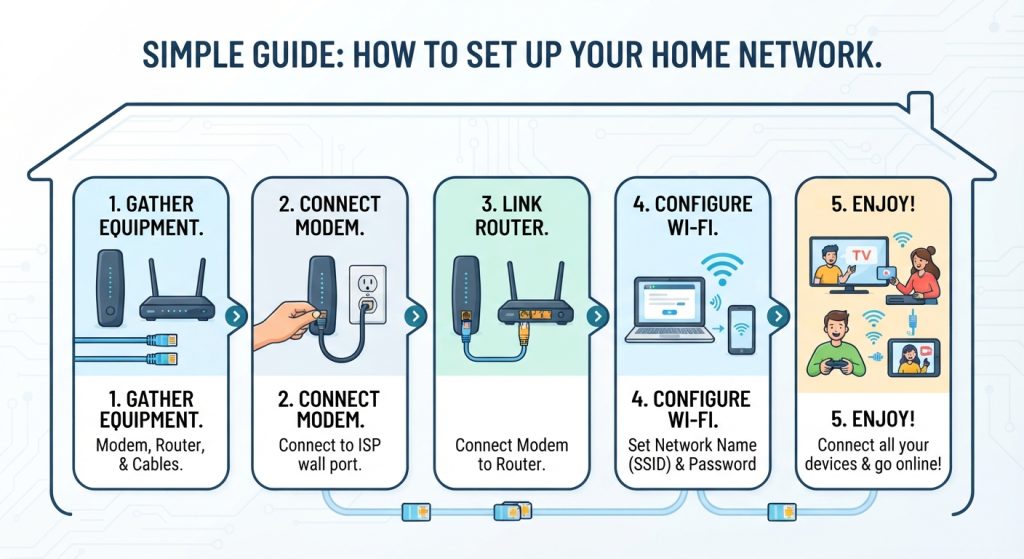
Setting up a reliable home network ensures seamless streaming, fast file transfers, and stable connectivity for all your devices. Here is a clear, step-by-step guide to getting your home network up and running:
1. Gather Your Core Equipment
Before starting, make sure you have the necessary hardware:
- Modem: Connects your home to your Internet Service Provider (ISP).
- Router (or Mesh System): Broadcasts your Wi-Fi signal and manages traffic between your devices and the internet. (Many modern setups use a combined modem/router gateway provided by the ISP).
- Ethernet Cables (Cat 6 or better): For hardwiring stationary devices like desktop computers or smart TVs for maximum speed.
2. Connect the Hardware
- Plug in the Modem: Connect your modem to the cable or telephone wall outlet provided by your ISP, then plug it into a power source. Wait a few minutes for it to establish a steady connection.
- Link Modem to Router: Connect an Ethernet cable from the modem’s LAN port to the router’s WAN (or Internet) port.
- Power Up the Router: Plug in your router and wait for the indicator lights to show it is ready.
3. Access and Configure Your Router
- Connect to the Default Wi-Fi: Look at the sticker on the bottom of your router for the default network name (SSID) and password. Connect a phone or laptop to it.
- Log Into the Admin Panel: Open a web browser, enter the router’s default IP address (usually found on the sticker, such as
192.168.1.1or192.168.0.1), and log in using the default administrator credentials. - Secure Your Network:
- Change the default admin password to a strong, unique password to prevent unauthorized access.
- Rename your Wi-Fi network (SSID) and set a secure, robust Wi-Fi password (ideally using WPA3 or WPA2 encryption).
4. Optimize Placement and Coverage
- Central Location: Place your router in a central, open location in your home, elevated off the floor if possible. Avoid hiding it inside metal cabinets, behind thick concrete walls, or near large appliances that cause interference.
- Consider a Mesh System: If you have a large home or thick walls that block signals, consider setting up a mesh Wi-Fi system with multiple nodes to eliminate dead zones.
5. Connect Your Devices and Test
- Connect your smartphones, tablets, and wireless laptops to your new secure Wi-Fi network.
- Plug high-demand devices (like gaming consoles or home office PCs) directly into the router’s Ethernet ports for the lowest possible latency.
- Run a speed test to ensure your download and upload speeds match what you are paying for from your ISP.